How to Create and Sell Video Courses with Vidnoz AI?
Online learning is one of the largest digital industries today. People do not want to read long manuals anymore. They want to learn through a short lesson, a recorded tutorial, or an easy to follow video guide. Whether it’s business training, fitness training, or language instruction, video courses are providing creators a way to monetize their expertise.
However, the difficulty is that it can take a considerable amount of time and expense to create courses. Making videos, editing content, obtaining voice artists, and setting up equipment might not be feasible for everyone.
That’s why AI video tools are growing in popularity in the education, training, coaching, and content creation sectors. Vidnoz AI is one of the platforms that are gaining traction in 2026. It assists the user to make educational videos in a short period without needing advanced production skills.
Introducing Vidnoz AI for Course Creation
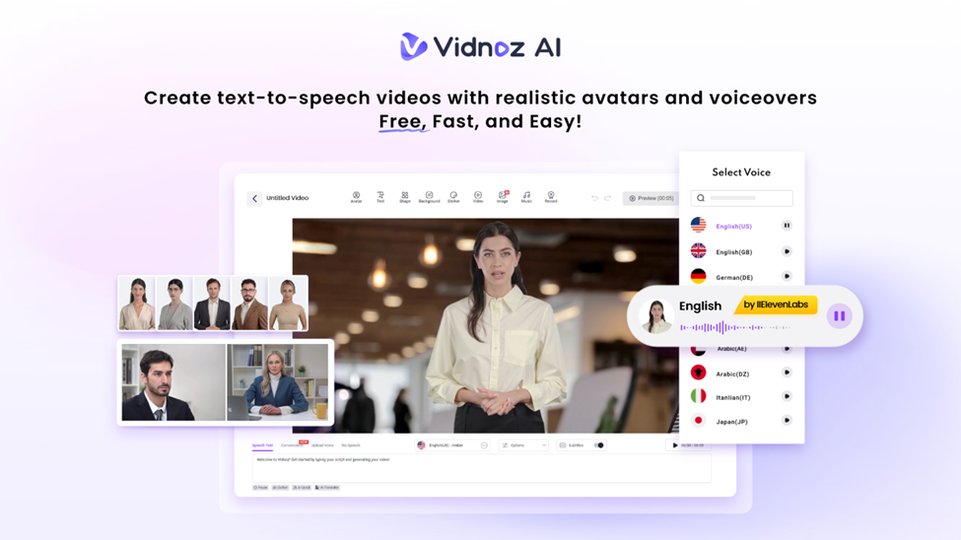
Vidnoz AI is an AI-driven video creation platform that makes video production easier. Before entering into its creative aspects, it is necessary to point its focus on information security.
Vidnoz AI is ISO/IEC 27001:2022 certified, demonstrating adherence to international standards for data and digital content security. This is important for teachers, companies and trainers who manage student information or private training content.
In addition to security, Vidnoz AI provides a host of tools that simplify and reduce the cost of creating video courses.
Features That Make Vidnoz AI Useful for Video Courses
Here are the key features which make it a suitable solution for creating video courses to monetize.
Natural-Sounding AI Voices
Vidnoz AI features over 2000 AI lip-sync voices available in various languages and accents. The voices are synced to the avatar’s speech to make lessons more natural and smooth.
These voices can be used by educators to narrate video courses without having to record audio separately.
Large Template Library for Learning Content
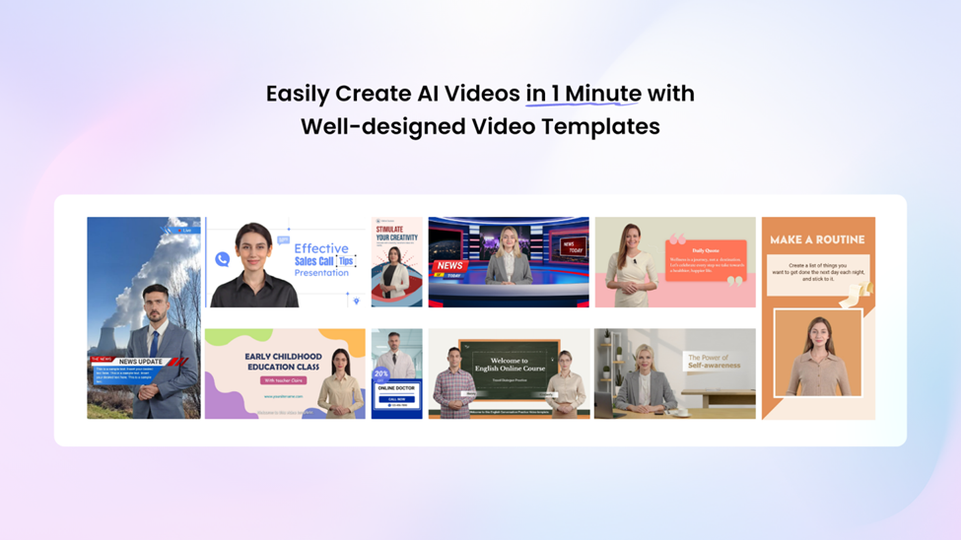
It offers more than 2800 templates for tutorials, educational videos, presentations and training sessions. There are templates in various languages which help creators to communicate with learners from various parts of the world.
Free Access for Beginners
Vidnoz AI offers users the ability to produce 2 minutes of free video every day. This allows new users to experiment with the tool and see how lesson ideas work without committing any initial expenses.
This is a good way for new video course creators to get a feel for creating educational content.
Realistic Avatars for Teaching Videos
Vidnoz AI has more than 1900 AI avatars that are available for various industries and professions. Users can choose avatars according to the type of video course they are making. These avatars can speak 40 different languages and help you create lessons for a wider audience in no time. There are several creation modes that can be found on the platform
- Avatar Lite for quick and simple video courses production
- Custom Avatar Pro for more editing flexibility and custom backgrounds
- Motion Avatars with natural gestures, posture movement, and facial expressions
Why Video Courses Perform Better Than Text Lessons?
Many students find video learning easier, because it contains all visuals, audio, as well as explanations in a single format. It is easy for people to grasp a concept when presented with demonstrations or examples directly.
Here is why video courses are still on the rise
- Students can watch lessons anytime
- Visual explanations improve understanding
- Videos feel more engaging than plain text
- Creators can teach larger audiences online
Creating lessons becomes much faster compared to traditional production methods with tools like Vidnoz AI.
Step-by-Step Guide to Creating Courses with Vidnoz AI
Here are the key steps you need to follow to create video courses with Vidnoz AI.
Create Your Account and Access the Dashboard
The first step is to sign up with Vidnoz AI video generator via email. After logging in, you will find all of the templates, avatars, editing tools and saved projects organized in the dashboard. These can make the video creation process easier.
Choose a Template or Teaching Avatar
Look at the templates and choose one that is suitable for your educational or tutorial video. There are also AI avatars available to choose. You can select the ones that suit your teaching styles, ranging from teachers, to presenters and even professional-looking hosts.
Add Lesson Scripts and Select AI Voices
Type the lesson script into the text box and choose the AI voice you want to use that matches the tone of your lesson. Language settings, speech speed and pronunciation can be controlled for smoother lesson delivery.
Edit Visuals and Add Learning Elements
Tweak the colors, backgrounds, lesson titles and animations to suit your course style. In addition, for Custom Avatar Pro, there are more settings that can be used to control the visual presentation more deeply.
Generate Videos and Upload Your Course
When you are done editing, create the lesson video within the platform. Download your completed file and share it on course marketplaces, membership websites or learning platforms that students can access.
Different Ways to Sell Your Video Courses
You can sell your video courses in different ways to make money. Some of the possible ways include
- Online Learning Platforms
Courses can be posted on well-known learning sites that students check out for new skills on a frequent basis.
- Your Own Website
Some creators would prefer to sell through their own websites where they can have the control of pricing and branding.
- Social Media Promotion
Brief snippets of your lessons can be posted on TikTok, Instagram Reels or YouTube Shorts to reach prospective students.
- Email Marketing
You can also use email marketing to send lesson previews or educational clips, which can help boost the sales of courses and student interest.
Final Thoughts
Video courses one of the most popular methods to teach and make money today in 2026. Online learning is becoming more common, providing great opportunities for teachers and content makers. Vidnoz AI offers a great way to use Ai video creation and make video lessons that you can monetize without spending a lot of time and money on the process.